
Scene 1.
You have top notch #andriod phone, Purchased at a premium price.....
You have waited long to get the dream phone in a flash sale from a well known portal... you kept your fingers crossed to get lucky..a nd you get confirmation in your cart that the phone will be delivered in xx days to the address.....hooraaaah
Scene 2.
You get a birthday gift.. open the package and you have the phone that you dreamt off
BUT THE PHONE BATTeRY DIES UP VERY QUICKLY..ONCE IT WAS IN THE MIDDLE OF YOUR TALK WITH YOU GF..it cost you three dinner dates and a costly gift
SECOND TIME .. It was during your feedback report to your boss.... nearly cost you your next increment..
MOST RECENTLY.. You had to sleep on couch because your wife thought your cut her call deliberately and switched off the phone.
YOU THOUGHT OFF CHANGING PHONES TOO BUT PROHIBITIVE COST KEEPS YOU FROM CHANGING IT FOR SOMETIMES..
DONT WORRY .. JUST FOLLOW THESE THREE SIMPLE STEPS TO ENHANCE YOUR BATTERY LIFE
1. SWITCH OFF YOUR LOCATION BASED SERVICES WHEN NOT REQUIRED.... how..
2. Switch off the wifi services when on move and if you are not using it, just switch off wifi by tapping on this icon(first icon on top left corner in Image 1 above)
3. TURN OFF YOUR NOTIFICATIONS(these are the messages you get about status updates and apps activities ..third block marked as notifications in image given below)
You have top notch #andriod phone, Purchased at a premium price.....
You have waited long to get the dream phone in a flash sale from a well known portal... you kept your fingers crossed to get lucky..a nd you get confirmation in your cart that the phone will be delivered in xx days to the address.....hooraaaah
Scene 2.
You get a birthday gift.. open the package and you have the phone that you dreamt off
BUT THE PHONE BATTeRY DIES UP VERY QUICKLY..ONCE IT WAS IN THE MIDDLE OF YOUR TALK WITH YOU GF..it cost you three dinner dates and a costly gift
SECOND TIME .. It was during your feedback report to your boss.... nearly cost you your next increment..
MOST RECENTLY.. You had to sleep on couch because your wife thought your cut her call deliberately and switched off the phone.
YOU THOUGHT OFF CHANGING PHONES TOO BUT PROHIBITIVE COST KEEPS YOU FROM CHANGING IT FOR SOMETIMES..
DONT WORRY .. JUST FOLLOW THESE THREE SIMPLE STEPS TO ENHANCE YOUR BATTERY LIFE
1. SWITCH OFF YOUR LOCATION BASED SERVICES WHEN NOT REQUIRED.... how..
- Simply swipe down from the top of home screen,
- Uncheck/remove highlight from location services/GPS.(second icon from left in first line in the Image 1 given below)
- You can always turn it on when required
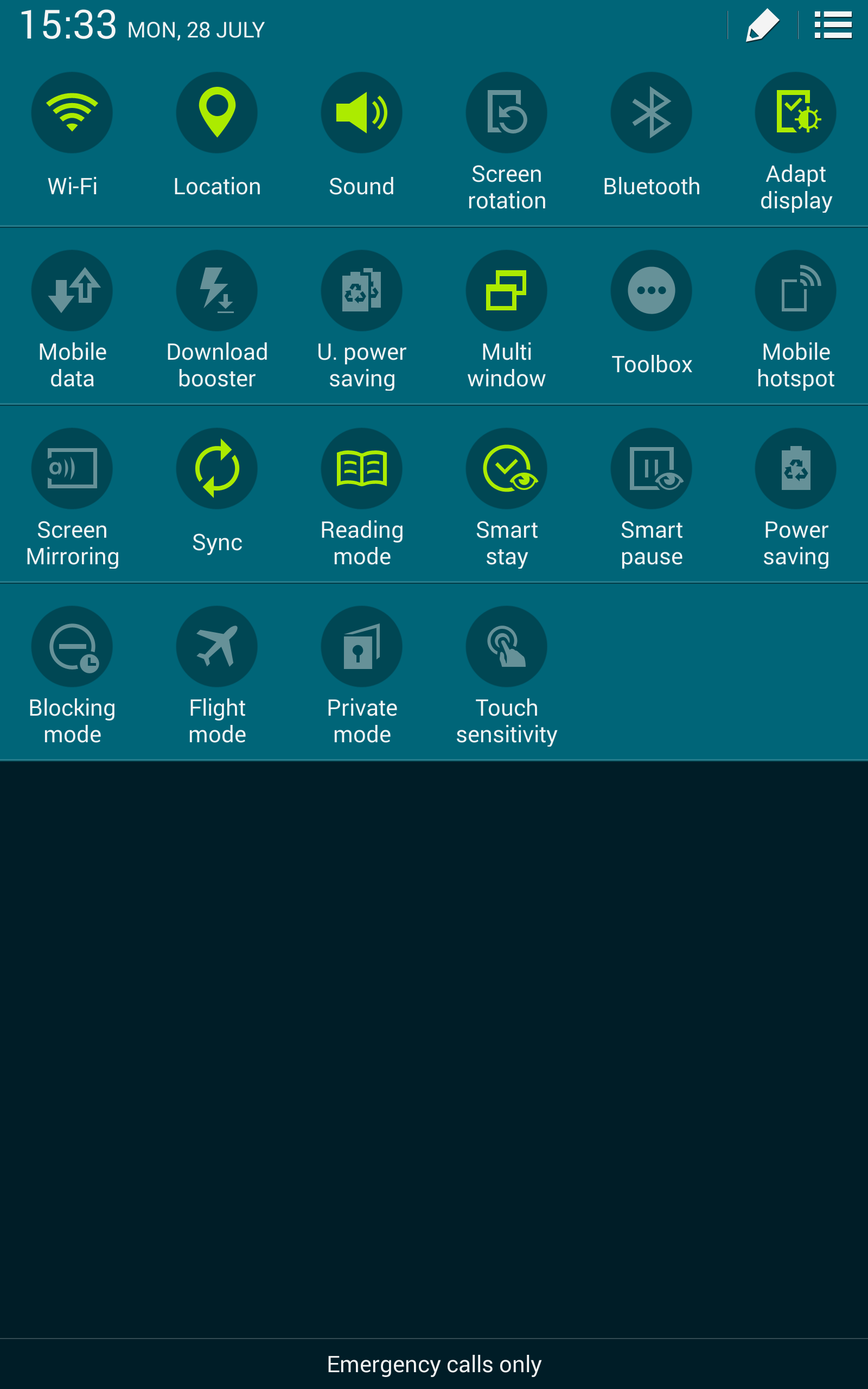 |
| Image 1 |
3. TURN OFF YOUR NOTIFICATIONS(these are the messages you get about status updates and apps activities ..third block marked as notifications in image given below)
- Just check in the settings under notifications, you will see all the apps for which the notifications have been enabled by default,
- Choose and uncheck or slide back the options for apps you don't want the notifications to be given..
- This is a big battery drainer.
 |
| Image 2 |
#happyhunting, #3tips ..enjoy increased battery life
( All the images are copyright of respective owners and in no way the blogger claims their images ownership, for educational and informativepurpose only)
( All the images are copyright of respective owners and in no way the blogger claims their images ownership, for educational and informativepurpose only)
